
Zphisher Your Gateway to Understanding Phishing Attacks
Zphisher is an open-source automated phishing simulation tool designed for cybersecurity education and penetration testing practice. It helps users generate fake login pages of popular websites in a controlled environment so that security researchers can understand how phishing attacks work in real scenarios.
What is Zphisher?
Zphisher is an open-source automated phishing simulation tool used to create fake login pages of popular websites for educational and security testing purposes. It is mainly designed for ethical hackers and cybersecurity learners to understand how phishing attacks work in real-world scenarios.
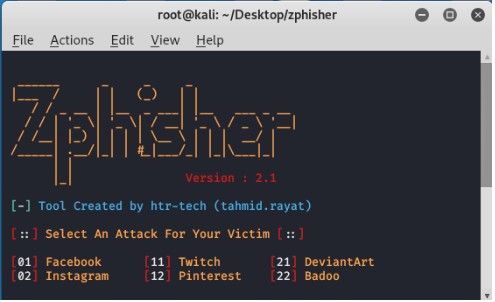
Powerful Features
Pre-built Templates
Zphisher provides ready-made login page templates for 30+ popular websites for quick testing and learning purposes.
Automatic setup
It automatically installs dependencies and configures required files, making the tool easy for beginners without manual complex setup steps.
Multi-platform support
Zphisher runs smoothly on Linux systems and Android Termux, allowing users to practice ethical hacking on different devices easily.
Tunnel integration
It uses tunneling services like Ngrok or Cloudflared to generate public URLs for locally hosted phishing simulation pages.
Credential capturing
When users enter data on fake pages, Zphisher securely captures submitted credentials for educational analysis in controlled environments only.
How Zphisher Works
Zphisher basically automates the process of creating a fake login page + public link + data capture system. Here’s how each step works:
Launch Tool
- When you start Zphisher:
- It loads a menu-based interface (usually in terminal)
- Checks required dependencies (like PHP, bash, etc.)
- Prepares local server environment
Select Target Website Template
- You choose a template such as:
- Facebook login page
- Instagram login page
- Gmail login page
- What happens internally:
- The tool selects a pre-built HTML/CSS phishing page
- These pages are stored in its templates folder
- Each template mimics the real website design
Generate Phishing Page
- After selection:
- Zphisher runs a local PHP server
- The fake login page is hosted on your device (localhost)
- Inside:
- HTML form is connected to a backend script
- That script is responsible for capturing submitted data
Create Public Link via Tunnel
- tunneling tools like:
- Ngrok
- Cloudflared
- What happens:
- Local server (localhost:port) is exposed to the internet
- A public URL is generated (e.g., https://random-link.ngrok.io )
Installation Guide
Requirements (Linux / Termux)
Before installing Zphisher, you need a proper environment.
Launch Tool
- When you start Zphisher:
- It loads a menu-based interface (usually in terminal)
- Checks required dependencies (like PHP, bash, etc.)
- Prepares local server environment
Launch Tool
- When you start Zphisher:
- It loads a menu-based interface (usually in terminal)
- Checks required dependencies (like PHP, bash, etc.)
- Prepares local server environment
Git Clone Method
What is Git Clone?
It simply means: “Download the full project from GitHub to your device”
- Process:
- Open terminal (Linux / Termux)
- Use git command to copy repository locally
Installation Commands Overview
After cloning, installation usually involves:
Navigate to folder
Move into downloaded directory
Give permission
Make scripts executable
Install dependencies
Required packages are installed automatically or manually
- What happens here?
- Tool checks system environment
- Installs required modules
- Prepares phishing templates
- Sets up tunnel options
Use Cases of Zphisher
Ethical Hacking Practice
The most common use of Zphisher is in ethical hacking practice. Beginners use this tool to understand how phishing attacks work.
- Structure analysis
- Social engineering
- Identification skills
Cybersecurity Training Labs
In professional labs, students are shown real-world scenarios so that learning becomes practical.
- Controlled Env
- Live Sim
- Gap Analysis
Phishing Awareness Testing
Organizations run simulations to educate their employees so that they can avoid traps.
- Goal: Educate employees, not punish them.
Penetration Testing Education
Beginners learn the attack lifecycle (from setup to execution) using it, which is the foundation of penetration testing.
- Related Tools:
- Metasploit
- Kali Linux
Advantages of Zphisher
Why security researchers and beginners prefer this tool.
Easy to Use
Zphisher is designed with simplicity in mind. It provides a menu-based interface, so users don’t need advanced coding or technical knowledge.
Beginner Friendly
Especially helpful for newcomers in cybersecurity. It removes complex manual steps and offers pre-built templates for real scenarios.
Fast Setup
Can be installed and run quickly with minimal configuration. Most dependencies are automatically handled, saving hours of manual setup.
Educational Value
Helps students understand how phishing pages are created, how attackers trick users, and how to build defense awareness.
Alternatives to Zphisher
| Tool Name | Type | Purpose | Best For |
|---|---|---|---|
| Metasploit | Framework | Exploitation & vulnerability testing | Advanced penetration testers |
| Social-Engineer Toolkit (SET) | Toolkit | Social engineering & phishing simulation | Security awareness & phishing tests |
| Kali Linux | Operating System | Complete ethical hacking platform | Cybersecurity professionals |
FAQs
Basic FAQs
What is Zphisher?
Zphisher is an open-source phishing simulation tool used for ethical hacking and cybersecurity learning.
Is Zphisher a hacking tool?
Yes, but it is mainly used for educational purposes and security testing, not illegal hacking.
What is the main purpose of Zphisher?
Its main purpose is to help users understand how phishing attacks work in a controlled environment.
Is Zphisher free to use?
Yes, it is completely free and open-source.
On which platforms can Zphisher run?
It runs on Linux and Android (Termux environment).
Do I need coding skills to use Zphisher?
No, it is beginner-friendly and does not require advanced programming knowledge.
Technical FAQs
How does Zphisher work?
It generates fake login pages and uses tunneling services to make them accessible online for testing.
What tools does Zphisher use for links?
It commonly uses tunneling services like Ngrok or Cloudflared.
Can Zphisher steal real passwords?
It can capture credentials in test environments, but using it on real users without permission is illegal.
Is Zphisher detectable?
Yes, modern security systems can detect phishing pages easily.
Can Zphisher run on mobile?
Yes, it can run on Android using Termux.
Is internet required for Zphisher?
Yes, internet is required to generate public phishing links.
Legal & Safety FAQs
Is Zphisher legal?
It is legal only for educational and authorized penetration testing purposes.
Is using Zphisher on real people allowed?
No, using it on real users without permission is a cybercrime.
Can Zphisher be used for ethical hacking practice?
Yes, it is widely used in cybersecurity labs and ethical hacking training.
What are the risks of using Zphisher?
Misuse can lead to legal action and violation of cyber laws.
Should beginners use Zphisher?
Yes, but only in safe environments like labs or tutorials.
What are safe alternatives to Zphisher?
Tools like Metasploit and Kali Linux are safer for structured learning.